Rocket Launch Pad
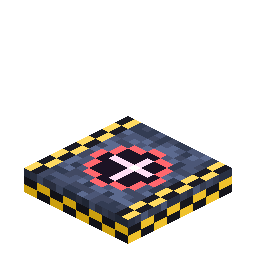
The mount a rocket is deployed onto before launch — and a safe landing zone.
Overview
Deploy a Rocket (right-click a launch pad with a rocket item) and it appears on the pad, ready to fuel and fly. The pad also acts as a small breathable safe zone so arrivals aren't immediately punished by the airless atmosphere.
Obtaining
Craft (shaped):
N N N
N B N
N N N
N = Nerosteel Ingot · B = Block of Nerosium
How it works
-
Deploy: right-click the pad with a rocket item to place the rocket entity on it. **A complete,
aligned 3×3 pad is required** — deploying on a partial pad shows a clear message instead. The same check re-runs at launch, so breaking pad blocks under a deployed rocket grounds it.
-
Tier gating:
-
Tier 3 additionally requires the 3×3 pad to be **ringed with
Station Wall** (the 16-block border of the surrounding 5×5, at pad level) — or a Heavy Launch Complex; either works.
-
Tier 4 deploys only on the Heavy Launch Complex.
-
-
Heavy Launch Complex: a complete, aligned 5×5 pad plus at least one
Launch Gantry module adjacent at pad level. Right-click the gantry to board the rocket; empty-hand right-click any pad block for a formation report (cluster size, largest square, modules present, next missing piece). See Launch Gantry.
-
Multiblock: pads placed adjacently form a cluster. A full, aligned 3×3 pad lets a
Fuel Tank auto-fuel 4× faster — and a Heavy complex 12× faster (480 mB/t).
-
Automation proxy: while a rocket stands on the cluster, every pad block exposes the rocket's
fuel-intake slot as an item capability — point a hopper or a Universal Pipe (item layer) at any pad block to feed in Rocket Fuel Buckets/Canisters (and pull out the empty buckets). A Fuel Tank + pipes on a 3×3 pad fully automates launch prep.
-
Safe zone: within a few blocks of a pad you can breathe, so you won't suffocate the instant you
land. Build an Oxygen Generator base for anything beyond the landing area.
Pad-to-pad travel
Launch pads double as the waypoints of rocket travel.
- Register a pad: right-click a pad with a Name Tag to commission it as a named travel node (the tag's name labels it, or "Pad N"). Registered pads become landing targets.
- Pick where you land: in the rocket UI you choose a destination (Home / a planet / the Orbital Station), then cycle a pad selector to land on a specific registered pad there — or Nearest to auto-pick. You can also hop pad-to-pad within the same dimension.
- Calculated fuel: a launch burns a base cost plus distance (for a same-world hop) or a flat cross-dimension surcharge. The cost is shown live in the console; the launch is blocked until the tank covers it.
- Return home: a rocket remembers the pad it launched from, so flying back lands you on that exact pad. A Landing Pod is only auto-built when the destination genuinely has no launch pad.
Details
- ID:
nerospace:rocket_launch_pad· Tool: pickaxe, iron tier · Drops: itself