Quarry Setup Guide
A step-by-step walkthrough for getting your first Quarry Controller digging — from crafting the parts to collecting the ore. For the full reference (every status line, frame damage, chunk loading, tiers) see the Quarry Controller page.
At a glance
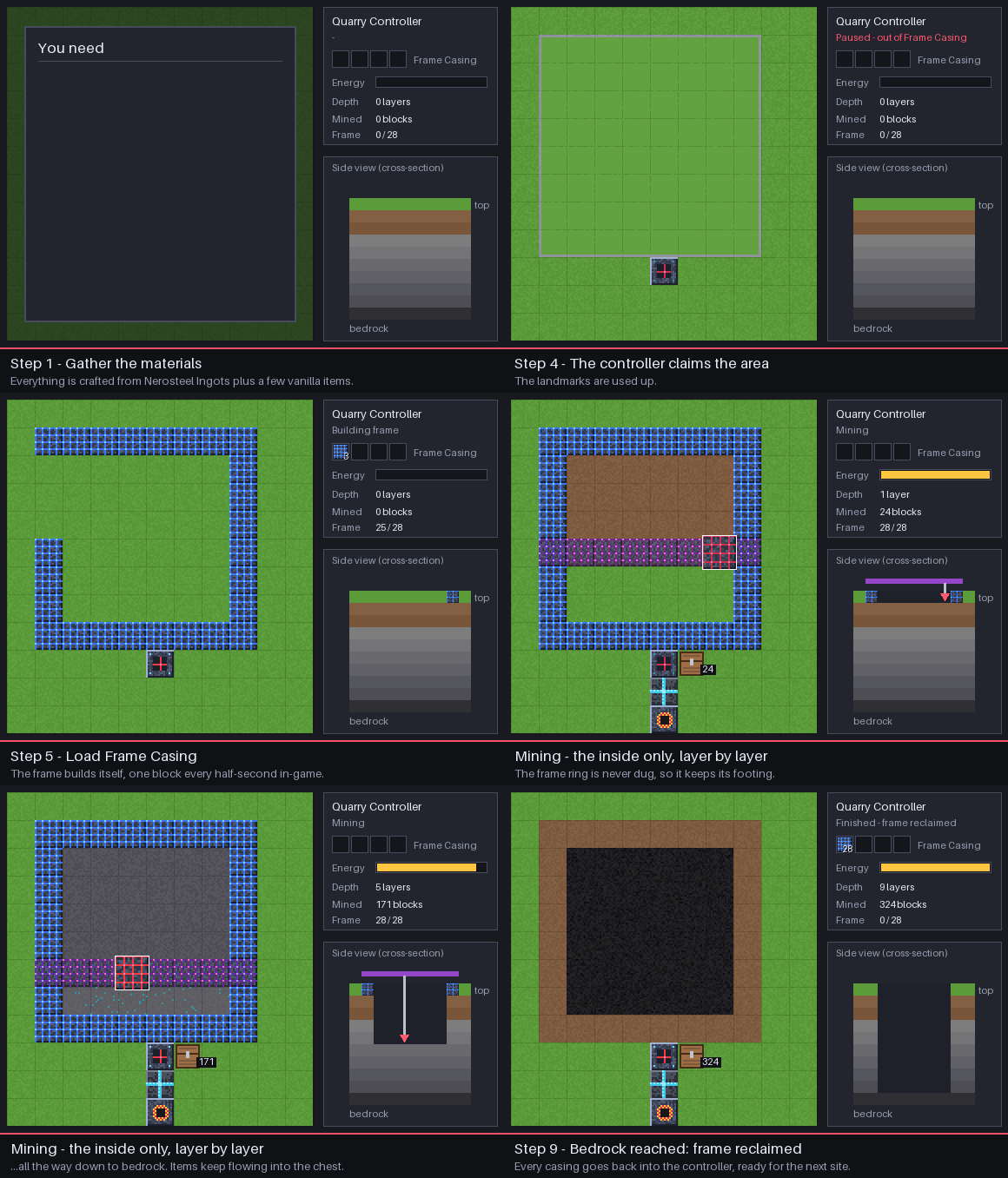
- Craft the parts: a controller, landmarks (or extra casings), Frame Casing, and a chest.
- Mark a rectangle with 3 Quarry Landmarks in an L, all at the same height.
- Place the controller at that same height, right beside one side of the rectangle.
- Load Frame Casing into the controller — it builds the frame.
- Connect power and an output chest — it digs to bedrock and fills the chest.
1. Gather the materials
Everything is built from Nerosteel Ingots (from Nerosteel Ore on Greenxertz), plus a few vanilla items.
| Part | Recipe | You need |
|---|---|---|
| Quarry Controller | 5 Nerosteel Ingot, 1 Diamond, 2 Frame Casing, 1 Block of Redstone | 1 |
| Quarry Landmark | Redstone over Glass over Nerosteel Ingot — makes 3 | 3 (one craft) |
| Frame Casing | 8 Nerosteel Ingot in a ring — makes 4 | see the table below |
| Power source | e.g. Combustion Generator or Passive Generator, plus Universal Pipe | 1 |
| Output storage | a Chest (or a pipe to your storage) | 1 |
How much Frame Casing? The frame is a ring around the rectangle: one casing per perimeter
block, i.e. 2 × width + 2 × length − 4 (one less if the controller sits on the ring itself).
| Area (landmark to landmark) | Blocks mined per layer | Casings | Nerosteel for casings |
|---|---|---|---|
| 8 × 8 | 6 × 6 | 28 | 56 |
| 16 × 16 | 14 × 14 | 60 | 120 |
| 32 × 32 | 30 × 30 | 124 | 248 |
| 64 × 64 (largest) | 62 × 62 | 252 | 504 |
Tip: the controller has 4 casing slots (256 casings), enough for the largest frame — and you get every casing back when the dig finishes, so your first set is reusable.
2. Pick the spot
- Planet: today's controller is Tier 1. It works in the Overworld, on Greenxertz and on the Orbital Station. On Cindara and Glacira it shows Paused — wrong planet (higher-tier controllers for those moons are planned).
- Height: the height you place the landmarks at is the frame level. The quarry mines that level and everything below it down to bedrock. Anything above it (trees, hills, your house) is left alone — so place the landmarks at ground level, or dig a flat pad first.
- Size: each side can be 3 to 64 blocks long, measured landmark to landmark (servers can
lower the limit with
quarryMaxSide— see Configuration). The outer ring becomes the frame, so only the inside is mined. - Clear the ring: blocks on the frame ring are replaced by frame (without dropping), so don't put anything you want to keep on it. Chests and machines on the ring are left in place, and anything with a block entity inside the area keeps its whole column un-mined.
3. Place the landmarks
Place three landmarks in an L, all at the same Y level:
- one at the corner,
- one in a straight line along X (east/west) from it,
- one in a straight line along Z (north/south) from it.
Those three give the four edges of the rectangle — you don't need a fourth.
  L . . . . . . . L        L = Quarry Landmark
  .               .        . = frame ring (built for you)
  .   mined area  .        C = Quarry Controller
  .               .
  L . . . . . . . . C      <- the controller sits right beside a side,
                              in line with it, at the same Y
The landmarks project marker lasers along the ground on their axes, which makes it easy to line the three up before you go on.
4. Place the controller
Place the Quarry Controller at the same Y level as the landmarks, directly beside one side of the rectangle (touching the edge — not off a diagonal corner). You can also place it on the ring itself — it then takes that frame block's spot.
Within a moment the controller finds the landmarks and claims the area. The landmarks are used up (they disappear) and the status changes from Idle to Paused — out of Frame Casing or Building frame.
Still saying "Idle — set landmarks or frame"? Check that the controller and all three landmarks share one Y level, that the controller touches a side (not a corner), and that no side is longer than 64 blocks (or your server's
quarryMaxSide).
Alternative: no landmarks
Frame Casing is placeable. Instead of landmarks, build a complete, closed rectangle of frame blocks on one level (no gaps, no stray blocks sticking out) and place the controller beside it. The controller adopts your ring and starts mining right away, skipping the frame-building step.
5. Load Frame Casing
Right-click the controller and put Frame Casing into the four slots at the top-left of the screen (a hopper or pipe pointed into the controller works too). It places one frame block every half-second, walking the ring. When the ring is done, the status changes to Mining.
6. Connect power
Mining costs 40 FE per block (the frame itself is free). The controller holds 200,000 FE and accepts energy from any side — run a Universal Pipe from a generator or a Battery, or put the generator right against it. Energy from other mods' pipes and generators works too.
A Tier 1 quarry with no modules mines about 4 blocks a second, using roughly 8 FE/t — a single Combustion Generator (20 FE/t) or even a Passive Generator (8 FE/t) keeps it running. If power runs out it shows Paused — out of power and continues on its own once energy arrives.
7. Collect the output
Mined items go into the controller's 12-slot output buffer and are pushed automatically into any chest or inventory touching the controller (or pulled out by a pipe). If everything is full it shows Paused — output buffer full — nothing is ever thrown away; empty the chest and it continues.
Liquids: water and lava source blocks in the area are sucked into a 16,000 mB tank, which is pushed into a touching Fluid Tank or pipe. Liquid that doesn't fit is destroyed so the dig never stalls. Don't want any of it? Fit an Evaporator Module (below).
A good starting layout is controller, chest on one face, power pipe on another — then walk away.
8. Optional: upgrade modules
The Tier 1 controller has one module slot (to the right of the casing slots). Pick one:
| Module | Effect |
|---|---|
| Speed | +50% digging speed |
| Efficiency | −15% energy per block |
| Fortune | Fortune on every block mined (more ore drops) |
| Silk Touch | Ores and blocks drop themselves |
| Evaporator | Destroys liquids instead of storing them |
Recipes are on the Upgrade Modules page.
9. When it finishes
The quarry keeps digging layer by layer until it reaches bedrock (it skips bedrock and anything else unbreakable). Then it shows Finished — frame reclaimed: the frame is taken down and every casing goes back into the controller, ready for the next site. Break the controller — it drops itself plus the casings, modules and any buffered items — and set it up somewhere new.
Moving mid-dig? Breaking the controller before it finishes leaves the frame behind; those frame blocks crumble over a few minutes and each drops its casing. Put a controller back beside the ring before then and it picks the dig back up.
Troubleshooting
| Status | Fix |
|---|---|
| Idle — set landmarks or frame | Landmarks or controller at different heights, controller not touching a side, a side over the size limit, or an L with only two landmarks. |
| Paused — out of Frame Casing | Add more Frame Casing to the top-left slots. |
| Paused — frame incomplete | A frame block was broken. Add casings (it rebuilds the gap) or place a casing in the gap yourself. |
| Paused — out of power | Connect or add a generator / battery. |
| Paused — output buffer full | Put a chest against the controller, or empty the one that's there. |
| Paused — wrong planet | Tier 1 can't mine on Cindara or Glacira. |
See also
Quarry Controller · Quarry Landmark · Upgrade Modules · Universal Pipe · Configuration